
1. The Anatomy of the Hack: Why Old Shields Failed
To defeat the enemy, you must understand how they think. For years, we were told that a password like Tr0ub4dor&3 was safe. We were told that enabling SMS verification made us untouchable. The events of this week have shattered those illusions.
The Death of the Password
Passwords rely on a concept called "Shared Secrets." You know the secret, and Sony knows the secret. To log in, you tell Sony the secret.
The problem? Secrets get leaked.
If you use the same password on a forum that gets hacked, that password is now in a database on the Dark Web. Hackers use "Credential Stuffing" bots to try that email/password combination on millions of sites, including PSN. If you reused your password, you are breached instantly.
The SIM Swap Nightmare
"But I have SMS 2FA!" you say.
Hackers have a workaround called SIM Swapping. They call your mobile carrier, pretending to be you (using leaked data like your address or SSN), and claim they lost their phone. The carrier moves your phone number to the hacker's SIM card.
Now, when Sony sends the login code, the hacker receives it, not you. SMS is not a security layer; it is a convenience layer with massive holes.
Social Engineering: Hacking the Support Agent
The most terrifying vector—and the one likely used in the recent high-profile attacks—is attacking Sony's support staff, not the servers.
A hacker contacts PlayStation Support via chat, claiming they lost access to their email. If the support agent is not well-trained, or if the hacker provides enough "verification" data (like the Serial Number of the console, which can sometimes be guessed or found in photos), the agent might manually reset the email address, bypassing your password and 2FA entirely.
2. The Solution: What is a Passkey?
Enter the Passkey. Developed by the FIDO Alliance (Fast Identity Online), this technology fundamentally changes how login works.
Public Key Cryptography for Gamers
When you set up a Passkey, your device (iPhone, Android, or YubiKey) generates a pair of cryptographic keys:
1. The Private Key: This is stored securely on the hardware of your device (e.g., in the Apple Secure Enclave). It never leaves your phone. It is never sent to Sony.
2. The Public Key: This is sent to Sony and stored on their servers.
When you try to log in, Sony sends a mathematical puzzle to your phone. Your phone solves the puzzle using the Private Key and sends the answer back. Sony’s server uses the Public Key to verify the answer.
The Result: There is no password to steal. Even if hackers breach Sony's servers and steal the Public Key, it is useless without the Private Key physically located in your pocket.
Why Phishing is Impossible
This is the killer feature. Passkeys are domain-bound.
If a hacker builds a fake site like playstati0n.com (with a zero), your phone will refuse to authenticate. The Passkey protocol checks the browser URL. If it doesn't match the original playstation.com exactly, the cryptographic handshake fails. You are immune to fake login pages.
3. Pre-Deployment Checklist
Before we begin the operation, ensure you have the necessary equipment. Passkeys rely on modern hardware.
- A Modern Smartphone:
- Apple: iPhone running iOS 16 or later (with Keychain enabled).
- Android: Device running Android 9 or later (with Google Password Manager).
- Or a Hardware Key: A YubiKey 5 or Titan Security Key (for maximum paranoia).
- Updated Browser: Chrome, Edge, or Safari. Do not use obscure browsers for this setup.
- Account Access: You must know your current password one last time to initiate the setup.
4. Step-by-Step Operation: Activating PSN Passkeys
Follow these instructions precisely. Do not skip the backup steps.
Phase 1: Perimeter Breach (Login)
1. Open your browser (mobile or desktop) and navigate to playstation.com.
2. Sign in with your current credentials.
3. Click your Avatar in the top-right corner > Select Account Settings.
4. In the sidebar, locate and click on Security.
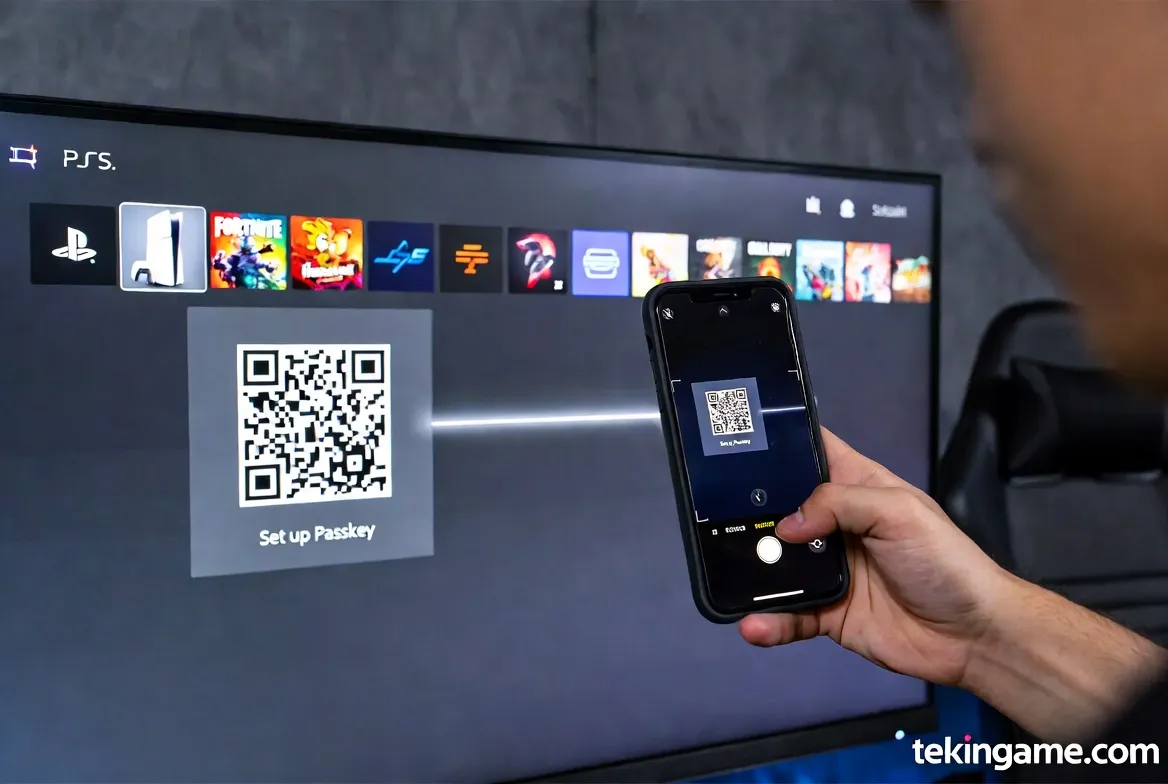
Phase 2: Nuclear Option (Disabling Password)
You will see a banner or option labeled "Sign In with Passkey".
1. Click Edit or Activate.
2. Sony will present a warning: "This will disable your password."
3. Confirm it. This is what we want. We want to remove the password so it can no longer be used as an attack vector.
Phase 3: Biometric Binding
1. Click "Create Passkey".
2. Your operating system will take over.
- On iPhone: FaceID/TouchID prompt will appear asking to save a passkey for "playstation.com".
- On Android: A fingerprint/screen lock prompt will appear.
3. Authenticate with your face or finger.
4. You will see a success message: "Passkey Created".
Phase 4: The Fail-Safe (Backup Codes)
What happens if you drop your phone in the ocean? You lose your Private Key. You are locked out forever... unless you have Backup Codes.
1. In the Security menu, find Backup Codes.
2. Generate a new set of 10 codes.
3. PRINT THESE OUT. Do not just save them on the phone that might get lost. Write them down or save them on a USB drive in a physical safe.
4. Each code works once. They bypass the Passkey requirement in an emergency.
5. Financial Air-Gapping: Protecting Your Wallet

Even with a Passkey, a session hijack (via malware on your PC) is theoretically possible. To protect your money, we implement an "Air Gap."
The Danger of Saved Credit Cards
Hackers love stored payment methods. It allows them to buy thousands of dollars of digital goods instantly.
Action Item: Go to Payment Management on the PSN site and Remove all Credit Cards, Debit Cards, and PayPal links.
The "Gift Card" Strategy
How do you buy games then?
Use Pre-paid Gift Cards.
If you want to buy a $70 game:
1. Buy a $70 PSN Card from Amazon/retailer.
2. Redeem the code.
3. Buy the game.
Benefit: Your account balance is always near $0. If a hacker gets in, there is no credit card to abuse. You limit your maximum financial loss to zero.
6. The Human Factor: Vulnerabilities You Ignore
Technology is strong; humans are weak. Avoid these three fatal mistakes:
- The "Date of Birth" Trap:
When creating an account, many users use a fake Date of Birth (DOB) to protect privacy. However, DOB is a primary security question for Sony Support. If you forget your fake DOB, you can never recover your account. Tip: If you use a fake one, write it down on your Backup Codes sheet. - Game Sharing (The Trojan Horse):
Sharing your account with a friend so they can play your games (Primary/Secondary activation) is a massive risk. You are trusting their device security. If their PlayStation gets compromised, or if they sell their console without formatting it, your account is exposed. Policy: Never share your main account credentials. - Insecure Email:
Your PSN Passkey is useless if your Gmail account has a password of "123456". If a hacker enters your email, they can reset everything. Action: Enable Passkeys/2FA on your email provider immediately.
7. Crisis Protocol: What to Do If You Are Hacked
If the worst happens and you receive that dreaded email notification, act fast. Seconds matter.
Step 1: Immediate Containment
Try to log in. If your Passkey still works, you are lucky.
1. Go to Security.
2. Click "Sign Out on All Devices". This force-quits the hacker's session on their console.
3. Change/Revoke your Passkeys immediately.
Step 2: The Support Ticket
If you are locked out, you must contact PlayStation Support via Chat or Phone. Be professional, clear, and prepared.
Have the following ready:
– The Serial Number of the console you used to create the account.
– A recent Transaction ID (from your email receipts).
– Your Credit Card details (last 4 digits) if used previously.
Use this script for clarity:
"I am reporting a compromised account. My Sign-In ID (Email) was changed without my authorization at [Time]. I have evidence of ownership including the serial number of the original console and recent transaction receipts. Please lock the account to prevent fraudulent purchases immediately."
8. Conclusion: Security is a Lifestyle
Commander, building a fortress takes effort, but maintaining it requires discipline.
The activation of Passkeys on PSN is a monumental step forward for gamer security. It takes the power away from phishing bots and puts it back in your hands (literally).
Do not wait for the "Sign-In ID Changed" email to ruin your weekend. Take 10 minutes today. Follow this guide. Secure your legacy.
Stay vigilant. Game On. 🛡️🎮